Care management
Care management software: One client record the whole team can trust.
When client information lives in five places, the version of the truth depends on who you ask. Corella keeps one record per person — the office sees all of it, a support worker sees what they need for the visit in front of them, and what happens on the shift comes back to the same record.


The rule you work under
Reportable incidents run on the Commission's clock
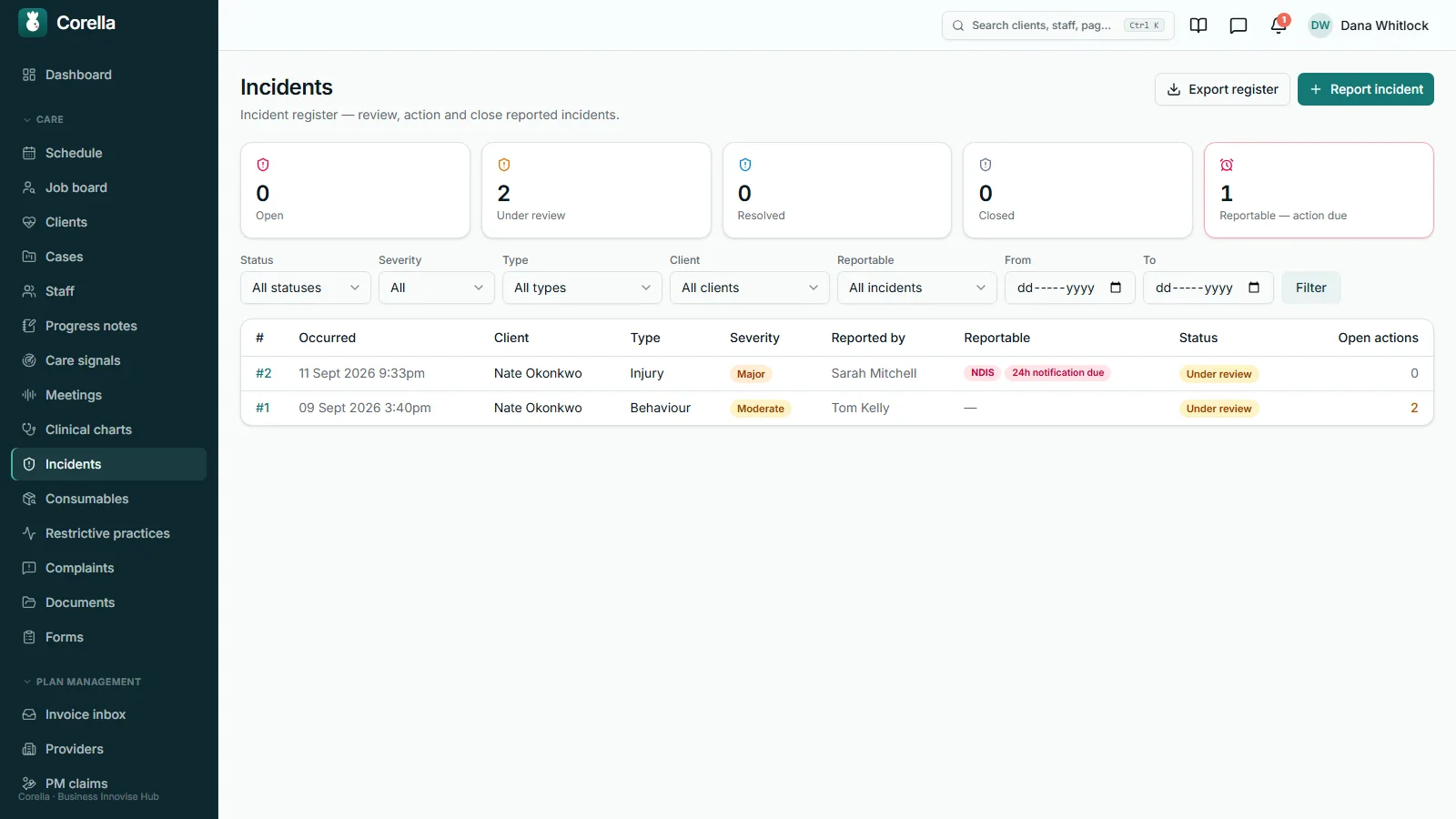
Registered NDIS providers must notify the NDIS Commission of reportable incidents — within 24 hours of becoming aware for the most serious categories, and within five business days for others. Your team makes the notification to the Commission; Corella flags the 24-hour notification until your team records it, counts down to the detailed report, and records when your team says each step was done; whether an incident is reportable, and in which category, stays your decision.
Reportable incidents — NDIS Quality and Safeguards CommissionHow it flows
From the record to the shift — and back to the record.
- 1The record
One record per person. Need-to-know for whoever is on the shift, office-only for the office, and contacts, funding, documents and the schedule on their own tabs.
- 2The plan
A structured support plan with sections of your own, goals the office tracks, and recurring tasks that copy onto each new one-to-one shift.
- 3The shift
The worker confirms the brief at clock-on when anything is recorded, ticks the plan's tasks, logs medication, records the charts your office keeps and notes how each goal went.
- 4The note
The progress note lands on the same record, behind the same walls. Once it's final, a correction is an addendum and the original stays.
- 5The follow-through
Incidents, restrictive practices and complaints each keep a register with dates, owners and outcomes — and the plan's review date brings the office back to step two.

What people ask first
The short answers, up front.
Who sees what?
The office sees the whole record. A support worker sees the people they're rostered with, through their shifts — the need-to-know panel, the notes you share, the plan's tasks and the medications — and office-only notes stay in the office.
What interrupts the worker at clock-on?
If anything is recorded under need-to-know, the brief appears and must be acknowledged before the shift can be started in the app. If nothing is recorded, nothing interrupts.
Do plan tasks reach the shift?
Yes. Recurring tasks copy onto each new one-to-one shift, and a mandatory task has to be ticked before the worker can clock off.
What happens once a note locks?
It stays exactly as written, for its author and everyone else. A correction is an addendum with its own reason, shown beneath the original.
Can workers chart from their phone?
Yes, while they're clocked on: the charts your office keeps for that person — bowel, food and fluid, weight and the rest — in their name, on that shift. The office starts each chart, and you can switch it off.
What does it keep for a reportable incident?
The dates: a flag on the 24-hour notification until your team records it, a countdown to the detailed report, and when your team says each step was done — and everyone who manages incidents is reminded before each date falls due.
Who decides whether an incident is reportable?
A person. They choose the NDIS Commission or aged-care SIRS track and a category that belongs to it; Corella then shows the dates that go with it.
What does the restrictive-practices report hold?
A monthly CSV of recorded uses — every use your coordinators logged that month, in one plain list.
Is there AI, and where does the text go?
Assistive features, each off until you switch it on. Text is processed by our AI provider in the United States under terms that prohibit training on customer content; speech is transcribed in the European Union, and once the text comes back your instance instructs that service to delete the recording and its copy of the text.
Are the care features all in the one price?
Yes. Incidents, support plans, charts, notes and the registers are all in the base product, with every safety-critical feature included.
Whose screen
The same job, from each seat.

In the office
The coordinator's screen is the whole record: need-to-know and office-only side by side, the plan and goals with each goal's recent observations written out as sentences, funding, documents and messages on their own tabs, and every note across every person with filters and a private-only tick. Marking a note final, adding an addendum and asking for a countersignature happen here, and so do the incident, restrictive-practice and complaint registers. The clinical record holds the charts and a seven-day medication grid.On the phone
A support worker opens their day on their phone, in a web app installed from the browser. For each shift: the address, the office's instructions, the need-to-know brief when anything is recorded, the plan's tasks, each medication with Given, Refused or Missed, the charts your office keeps for that person, a sentence for how each goal's strategy went, the note composer and Report an incident, with the visit attached. Mandatory tasks are ticked before clock-off — and, where you require them, the progress note and the forms you mark Needed before clock-off. A worker can correct their own notes on a visit from the phone until the note is final, and a form the office sends back arrives there with its reason, to fix and resubmit under the same rules — a locked note stays locked. If a note's save fails, the typed note stays on the phone and comes back when the visit is opened again, for up to seven days, ready to save.For families
Families see less than the office, on purpose. A portal login shows the person's visits for the next 28 days with the worker's name, their plan budget by category, and — where you manage their plan — the provider invoices to approve or decline. Notes, the support plan, incidents and anything marked office-only stay with your team. Portal logins are free, and your office invites each one from the person's record.A worked example
One reportable incident, and the two dates it carries
A participant falls on a Thursday afternoon and is taken to hospital; the coordinator on call marks the incident NDIS reportable. Here is what Corella shows — and what it leaves to your people. Demo timings, not advice.
- Occurred (demo)
- Thursday, 3:40 pm
- Track and category, chosen by a person
- NDIS Commission · serious injury
- 24-hour notification
- A flag until someone presses Record
- Five-business-day report
- Due the next Thursday, 3:40 pm
- If that Monday is a public holiday
- Still Thursday — only weekends are skipped
- Before each date falls due
- Everyone who manages incidents is reminded
- Escalation, with the offered preset ladder
- Team leader on report · risk manager at 4 h · general manager at 8 h
- Notified to the Commission
- By your team — Corella records when
Demo timings. The report date counts five business days from when the incident happened — which is never later than when you became aware — skipping weekends only, so the date on screen errs early, never late. Each escalation step fires only while nobody in the office has acted on the incident; any office action stops the chase. Whether it's reportable, on which track and in which category is your call.
Try it
See it work.
Today · 10:00am – 2:00pm
Community access with Nate O.
Riverside Library, then the pool
The record
Press Clock on, then have the office change the record before you confirm — the brief comes back, marked as updated.
On the timesheet
Nothing yet — press Clock on.
Demo data. The brief shows what your coordinators recorded — allergies first, a fixed display order, not an assessment — and records the confirmation with a digest of the wording shown. It does not verify that anyone understood it. If nothing is recorded, nothing interrupts; the brief is on by default, and your organisation can switch it off.
In detail
The detail, on the real screens.
One record, two audiences
Everything about a person sits in one profile, with a tab each for the care plan and goals, risks, funding, notes, messages, medications, documents, the schedule and billing. What support workers see is the need-to-know: medical conditions, allergies and intolerances in separate boxes, dietary needs, mobility, communication, access and entry — and, on their brief, the person's language, whether an interpreter is needed and their cultural background. Office-only notes stay in the office, identifiers such as a Medicare card or a DVA file number stay with the office, and so do up to twelve fields of your own, unless you open one to workers. A record moves between Prospect, Active, On hold — with an optional end date that reverts on its own — and Exited, which keeps everything and tells you how many booked shifts are still on the roster. Family contacts belong to one record; a GP, coordinator or plan manager is one directory entry linked to everyone they act for. Possible duplicates are listed with the reason, and nothing merges by itself: a person decides. Where you've opened the allied-health portal, the providers you refer to — physios, OTs, speech pathologists and the rest — sign in with a one-time code and see the people you've put them on, with where to visit and what they need to know.

Who needs attention — counted, check by check
On the client list, Needs attention counts the people each administrative check finds, in three groups: billing and funding — an agreement ended or ending within 30 days, released funds used up, unpaid invoices; care — forms waiting for approval, care-plan and risk-assessment reviews due within 30 days or past, a medication list that arrived as text and hasn't been entered, a medicine whose review is due within 30 days or past, prospects; and profile — consents and documents expired or expiring, no emergency contact, no next of kin, an NDIS number missing or not in the NDIA's format — plus possible duplicates. Select a check and the list shows exactly the people it counted. Under each count is the same check's count in the weekly snapshot, taken each Monday morning — “was 1” — so a coordinator sees what has moved since. Each person sees only the checks their role can open, and chooses the list's columns for themselves — Needs attention is one, naming each person's checks — without changing anyone else's list. Clients come in from a spreadsheet too: save your old system's export as a CSV, check which column is which, and Corella shows every row — to be added, already here, or held back with its reason — before one press adds the new clients. And name your towns or districts with the postcodes they cover: everyone on file falls into one by their postcode, and the client list, the roster's table and the reports show one area at a time. Each person's record says how long they've been in their status, and a prospect you've accepted can go on the waiting list, which the client list filters to, with how long each has waited.

The brief that interrupts at clock-on
If anything is recorded under need-to-know for the people on a shift — allergies and intolerances, medical, dietary, mobility, communication, language and interpreter needs, cultural background, behaviour support, access and entry, and any of your own fields opened to workers — the worker sees it when they press Clock on, and the clock-on only completes once they confirm they have read it. The timesheet row keeps a digest of the exact wording they were shown, so “was the allergy on the screen they read?” still has an answer months later; if the record changes before they tap, they are shown it again and told it was updated. It records that they confirmed it, and it shows your office's own words exactly as they were recorded — allergies first, in a fixed display order that's the same for every person, so the judgement about what they mean stays with your people. A Not now button closes it and leaves them clocked off, the whole prompt is a per-organisation setting, and when nothing is recorded there is no prompt at all. A person's Medical history tab keeps their conditions, past procedures and allergies — each allergy with its reaction and severity as recorded — and each recorded allergy leads the worker's need-to-know brief, substance and reaction.

Support plans that turn into shifts
A support plan is a structured document, not a blank page: about me, likes and dislikes, behaviours, decision-making, what to do when regular staff are away, an assistance grid across eleven areas, support-note sections, funding notes — and up to twenty sections of your own. It carries a review date and the team's coordinator and DSL, set on Clients → Coordinator allocation, shows the latest emergency-preparedness (PEPP) and environment (ERA) risk assessments with their review dates, and prints as a branded PDF. Reports from outside — a behaviour management plan, an allied health report, an aged care assessment — file on the same tab under your own categories, visible to workers when you tick it. Goals carry a progress figure the office sets. Recurring tasks copy onto each new one-to-one shift, and a mandatory task must be ticked before the worker can clock off. On the shift, the worker picks the sentence that fits each goal's strategy — from “Didn't happen today” to “Did it on their own” — recorded in their name, exactly as they chose it. When an intake completes, the new person's record starts with a draft support plan holding every answer that has a place in it — communication, mobility, mealtimes, health and allergies, behaviour support, their story and who helps them decide — each section marked From the intake, to check with them.

Progress notes, with walls — and a lock
Notes have kinds — progress, handover, feedback, enquiry, phone call and general — and support workers write progress, feedback and enquiry notes for the people they're rostered with. A coordinator can mark a note office-only, and sharing notes with the workers on someone's shifts is a per-person setting, on by default. Notes carry photos, a group-shift note lands on every person's record, you can require a note before clock-off with a minimum word count, and you can set required headings for each kind of note. A note written up after the shift can be attached to the shift it belongs to. Then the lock: a note becomes final when your auto-lock window passes — 12, 24, 48 or 72 hours, or seven days — or when its author marks it final on the office notes screen; a worker's notes lock by the window. After that nobody can edit it, not the author and not an administrator. A correction is an addendum with its own reason, author and time, shown beneath the original. On the office notes screen the author can also ask a named senior colleague to countersign, or to send it back with a reason.

Clinical charts and eMAR-lite
The clinical record holds twelve chart types — bowel (on the Bristol scale), food and fluid, weight with BMI from height, blood glucose in mmol/L, vitals, seizure, behaviour (antecedent, behaviour, consequence), sleep, repositioning, PRN observation, fluid balance and other — with trend lines for vitals, glucose, weight, sleep and fluid balance, beside the wound body map where wound care is switched on. The office starts a chart by recording its first entry on the clinical screens; from then on, a worker clocked on to that person's shift records it from their phone — timed now, or up to two hours back while they were clocked on — and the entry carries their name and the shift, beside the office's own. Medication is logged on the same shift screen: each active medication for each person shows Given, Refused or Missed, and a Webster pack's time is recorded once for everything packed then; someone with Clinical records at Manage — the coordinator level — can also record an entry from the person's record — Given, Refused, Missed or Unavailable, with an optional note, stamped when it's saved; and the clinical record keeps a seven-day grid that leaves an empty box wherever nothing was logged. Each medicine can also say what it's for, with its course and review; the worker can add a follow-up on each as-needed dose; and the Medication record downloads any days as a spreadsheet. It is administration recording: what happened at each dose, by whom and when.

Incidents: a flag, a countdown and a ladder
Anyone on staff can file a short report — hazard, incident or near miss, and a severity picked from four plain definitions — and everyone who manages incidents is told straight away. Where you've opened the allied-health portal, a provider can report one too, about someone on their list, under their name. The form works on a phone, and a support worker opens it from their own shift screen with Report an incident — the visit attached and, on a visit to one person, that person already chosen. The register tracks each incident from open to closed, with follow-up actions that carry an assignee and a due date, and an action can require a second person, not the one who did the work, to agree it's done. When an incident is reportable, a person picks the track — the NDIS Commission, or the aged-care Serious Incident Response Scheme (SIRS) — and a category that belongs to it. Where the category carries the 24-hour rule, the incident shows a flag, “required within 24 hours of becoming aware”, until someone records the notification. The detailed report gets a countdown — on the NDIS track, five business days from when the incident happened, with only weekends skipped, so the date errs early, never late; the SIRS track keeps its own categories and dates. Everyone who manages incidents is reminded before each date falls due. An escalation ladder you configure — who, in what order, after how many hours — notifies the next person only while nobody in the office has acted. Where your practice requires it, closing an incident waits for a named sign-off, and the Close-out card records who signed off and when; closing with follow-up actions open needs a reason. Each incident prints as a branded PDF, filed to the person's documents and hidden from workers.

Restrictive practices and complaints
Behaviour support plans — interim or comprehensive, with the practitioner and the dates — sit in their own register with the regulated restrictive practices they cover: the type, who authorised it, the reference, the expiry and whether the plan authorises it, with the authorisation's state at a glance. A coordinator logs each use as it happens. Log a use of a practice that isn't marked as authorised and Corella opens an NDIS-reportable incident for it, marked Major, and tells the office. At the end of the month, generate the report and download it: a monthly CSV of recorded uses. Complaints keep a register of their own — how each one arrived and from whom, anonymous included, a severity, an owner and a recorded outcome, from open to closed — and a complaint is resolved or closed only once its outcome is recorded, because a complaint closed without an outcome looks, at audit, exactly like one that was ignored. Your website's feedback form can send complaints, feedback and compliments straight into the register on a key of its own, and where you've opened the allied-health portal a provider can raise one under their name.

AI that reads, and a person who decides
Assistive features, each off until your organisation switches it on, and no AI tier. Care Signals reads new and edited notes every hour — or when you press Scan now — and queues anything worth a second look: health, behaviour, a shift issue, distress, safeguarding. Each signal quotes the note's own words, with a severity and a confidence score, and a person acknowledges it, follows it up, clears it or raises a pre-filled incident. The AI client summary gives office staff an overview of a person's record and recent notes, on office screens. Dictation lets a worker speak a note, then read and correct it before saving — the note records that speech was used, and with Care Signals on it's scanned straight away. Meeting summaries turn a recorded meeting into an editable draft that reaches a record only when a person files it. Text is processed by our AI provider in the United States under commercial terms that prohibit training on customer content. Speech is transcribed in the European Union; as soon as the text comes back, your instance instructs that service to delete both the recording and its copy of the text.

Straight answers
Safety built in: what warns you, and what it stops.
Warns you
- A support plan whose review is due within 14 days, or overdue — a daily in-app reminder to the office.
- A reportable incident's detailed report — a countdown on the incident itself, until your team records it as submitted, and everyone who manages incidents is reminded before each date falls due.
- Marking a reportable incident internal-only while its 24-hour notification is outstanding — the warning sits beside the button.
- An incident nobody in the office has acted on — the escalation ladder you configure notifies the next person, and any office action stops it.
- Restrictive-practice authorisations expiring within 30 days — counted on the register's own screen.
Stops you
- Clock-off, while a mandatory plan task on the shift is unticked.
- Clock-off without a progress note — where you've switched that rule on, optionally with a minimum word count.
- The clock-on, until the worker confirms the need-to-know brief — when anything is recorded. Not now leaves them clocked off.
- Saving a note while a required section is empty — where you've set sections up; N/A counts as an answer.
- Editing a locked note — for anyone, the author and administrators included.
- A note's author countersigning their own note.
Who stays responsible
Your people. Corella holds the record, shows each person the part that is theirs to see, and keeps the dates. Whether an incident is reportable, what a note means and what the plan should say stay with the coordinators and clinicians who know the person. The AI features are assistive and off until you switch them on; where they're on, a person decides every time, text is processed by our AI provider in the United States under terms that prohibit training on customer content, and speech is transcribed in the European Union, with your instance instructing that service to delete the recording and its copy of the text.
The rulebook
Questions, answered properly.
- Progress notes, in depth
- Incidents, in depth
- Medication recording (eMAR-lite), in depth
- Compliance & documents
- Clinical & episodes of care
- Rostering & attendance
- Security & data residency
- Try the NDIS demo
In the help centre

Can we keep track of the allied-health providers we refer people to?
Who reads an office-only note?
What happens when a worker presses Clock on?
When does a note lock?
How does a countersignature work?
How does Corella handle a reportable incident's notification?
How does the 24-hour item show?
How is restrictive-practice use reported each month?
What is eMAR-lite?
Can support workers chart observations on their phone?
What does the AI do — and who decides?
Can the team talk about a person in Corella — and does it reach their record?
Does each person have a risk profile?
What do families see?
Guides for this
Read the rule behind it.
Sources
- Reportable incidents — NDIS Quality and Safeguards Commission
- Incident management — NDIS Quality and Safeguards Commission
- Behaviour support and restrictive practices — NDIS Quality and Safeguards Commission
- NDIS Practice Standards — NDIS Quality and Safeguards Commission
- Australian Privacy Principles quick reference — OAIC

See care management software on a live instance.
Try the NDIS demo with a time-boxed pass, or book a walkthrough and we'll show you this part of Corella in your own words.